Image Generation Toolkit
This toolkit gives the agent the ability to act as a creative director, generating high-fidelity images on demand using DALL-E 3. It transforms text descriptions into visual assets instantly. The agent can create original artwork, illustrations, diagrams, and photorealistic images based on natural language descriptions.
Configuration Options
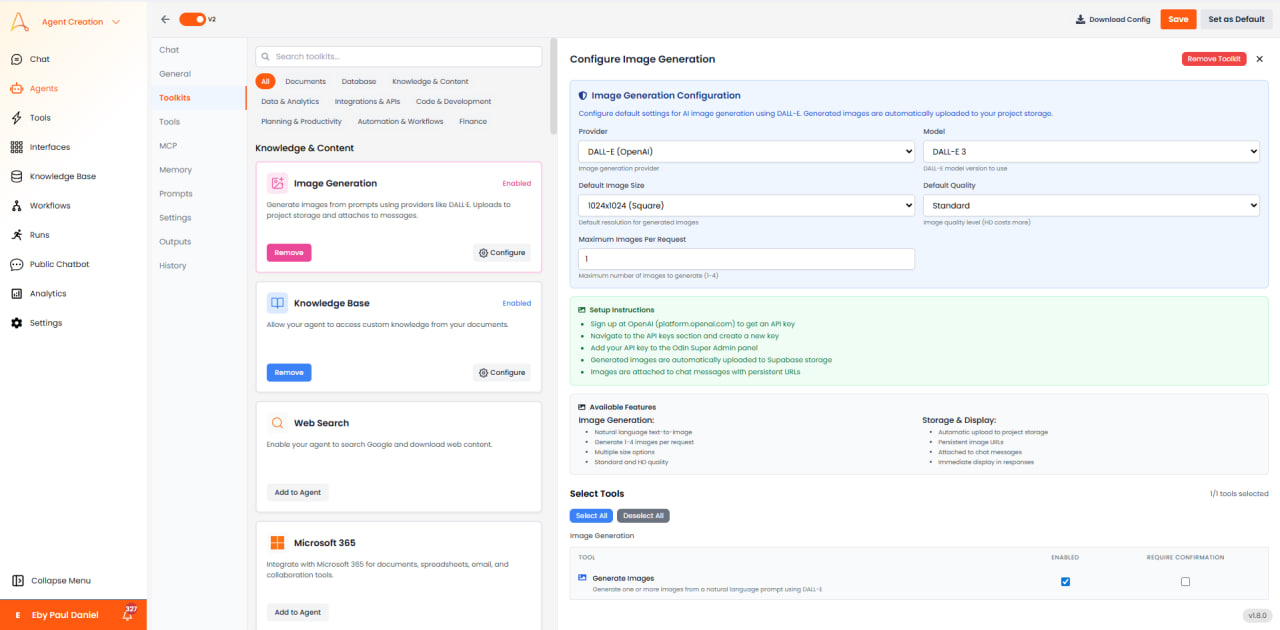
The Image Generation Toolkit configuration panel allows you to set default preferences for image generation:
- Provider: DALL-E (OpenAI) - The AI image generation provider.
- Model: DALL-E 3 - The model version used for image generation.
- Default Image Size: Choose from 1024x1024 (Square), 1024x1792 (Portrait), or 1792x1024 (Landscape).
- Default Quality: Standard (faster, lower cost) or HD (more detailed, higher cost).
- Maximum Images Per Request: Generate 1-4 images at once (set range 1-4).
Image Size Options
| Size | Description | Use Case |
|---|---|---|
| 1024x1024 (Square) | Standard square format | Avatars, icons |
| 1024x1792 (Portrait) | Vertical orientation | Phone wallpapers, posters |
| 1792x1024 (Landscape) | Horizontal orientation | Desktop wallpapers, slides |
Available Tools
The Image Generation Toolkit provides one tool that can be enabled or disabled:
- Generate Images: Generate one or more images from a natural language prompt using DALL-E. This tool can be configured to require user confirmation before execution.
Storage & Display
- Automatic Upload: Generated images are automatically uploaded to your project storage.
- Persistent URLs: Images receive permanent URLs for reliable access.
- Chat Integration: Images are attached to chat messages and displayed immediately in responses.
Prompting Best Practices
- Be specific about style, lighting, and composition (e.g., "shot from above with natural sunlight").
- Use descriptive adjectives (e.g., "cinematic lighting," "hyper-realistic," "minimalist," "vintage").
- Avoid vague terms like "cool" or "nice" - instead describe exactly what you want.
- Iterate on prompts based on generated results - refine and adjust for better output.
- Specify perspective and framing (e.g., "close-up portrait," "wide-angle landscape," "bird's eye view").
- Include art style references when helpful (e.g., "in the style of Art Nouveau," "watercolor painting").
- Mention mood and atmosphere (e.g., "mysterious," "cheerful," "dramatic," "serene").
- For technical diagrams, be precise about layout and elements required.
Use Cases
- Marketing: "Generate 5 concepts for our new sneaker ad campaign."
- Storyboarding: "Create a scene showing a cyberpunk city in rain."
- Web Design: "Generate a placeholder hero image for a gardening website."
- Presentations: "Create an illustration representing 'Cloud Security' for my slide deck."