Overview
Agent Toolkits are pre-built integrations that extend what your agents can do. Each toolkit provides a set of specialized tools — query a database, search the web, run Python code, manage todos, and more — that agents invoke during a conversation based on your personality prompt and instructions.
Toolkits handle authentication, API wiring, and error handling so you can focus on agent behavior instead of building integrations from scratch. Combine multiple toolkits on a single agent to support complex, multi-step workflows.
Why Use Toolkits?
| Benefit | Description |
|---|---|
| Ready to deploy | Pre-configured integrations with sensible defaults — add a toolkit and start using it in minutes. |
| Secure by design | OAuth, service accounts, and encrypted connections are managed centrally in Settings → Connections. |
| Composable | Mix and match toolkits on one agent — for example, Knowledge Base + Python + Database for financial analysis. |
| Prompt-driven | Reference tools in your personality prompt with the @ symbol so the agent knows when and how to use each capability. |
Toolkits vs. Tools
EKB offers two ways to extend agent capabilities. Choose based on what you need:
| Type | What it is | Best for |
|---|---|---|
| Toolkits | Pre-built platform integrations (this section) | Standard capabilities and third-party apps (Gmail, Jira, Slack, databases, code execution, and more) |
| Tools | Custom tools and workflows you create or import | Proprietary APIs, business logic, and reusable multi-step automations — see Tools |
Many Agent Templates ship with toolkits already selected. Start from a template when you want a proven toolkit combination for a specific role or workflow.
Adding Toolkits to an Agent
- Open your agent in the Agent Builder and go to the Toolkits tab in the left sidebar.
- Browse available toolkits by category and click Add to Agent for each one you need.
- Click Configure on any toolkit that requires a connection and complete setup in Settings → Connections if prompted.
- Return to General Settings and update the Personality Prompt. Type
@to insert a tool reference and tell the agent when to use it. - Save your changes and test the agent in Chat.
For a step-by-step walkthrough of creating your first agent, see Create Your First AI Agent.
Available Toolkits
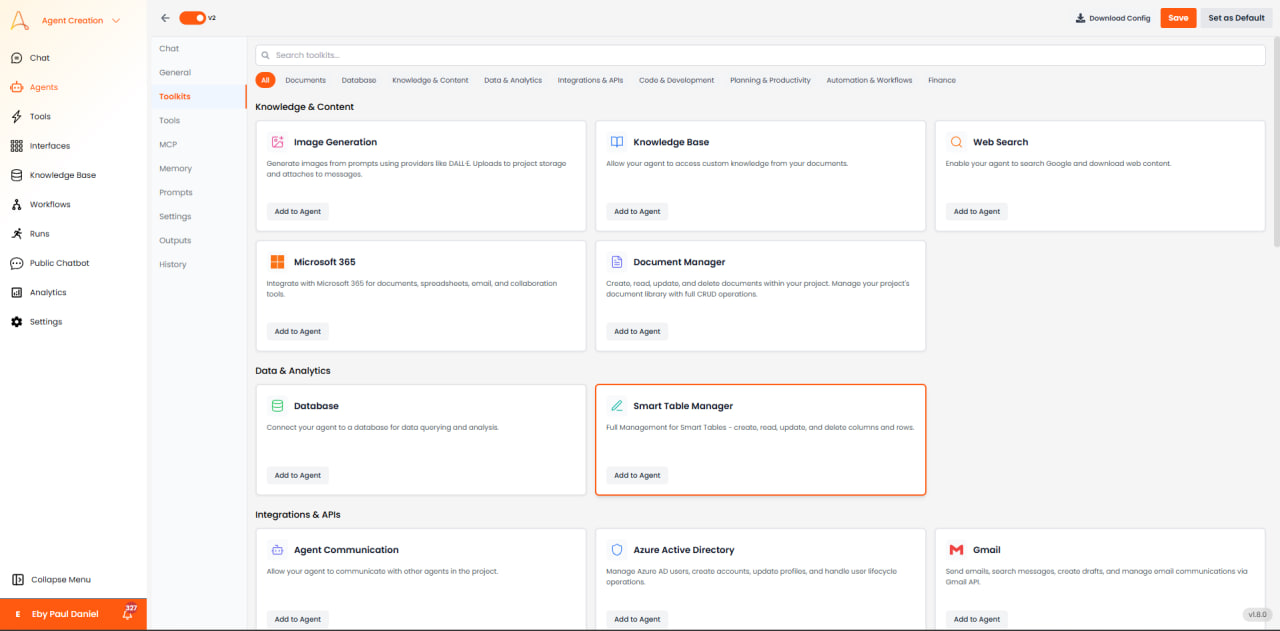
Toolkits in the Agent Builder are grouped by category. Select any card and click Add to Agent to attach it to your agent.
Knowledge & Content
Generate images from prompts using providers like DALL-E. Uploads to project storage and attaches to messages.
Allow your agent to access custom knowledge from your documents.
Enable your agent to search Google and download web content.
Create, read, update, and delete documents within your project. Manage your project's document library with full CRUD operations.
Extract text from PDFs, convert pages to images, and generate PDF documents from text or images. Supports file uploads and URLs.
Save, read, re-encode, and inspect files. Supports PDF, DOCX, XLSX, CSV, JSON, and more with intelligent text extraction, encoding conversion, and MIME type detection.
Data & Analytics
Connect your agent to a database for data querying and analysis.
Full management for Smart Tables — create, read, update, and delete columns and rows.
Query metrics, monitor application performance, analyze alerts, and explore entities using New Relic's NerdGraph API.
Manage Airtable bases, tables, and records. Create, find, update, and delete records in your Airtable workspace with API token authentication.
Manage AITable datasheets, records, and spaces. An open-source Airtable alternative for spreadsheet-database operations.
Hash text with MD5, SHA256, or SHA512 and generate secure random passwords. No API keys needed.
Query Unity Catalog tables, run warehouse SQL, inspect lineage and notebooks with a Databricks PAT or service principal.
Monitor infrastructure, manage incidents, query metrics and logs, and inspect hosts and dashboards.
Code & Development
Manage and create AI agents within your project using natural language descriptions.
Execute Python code in a secure sandbox environment and upload files from your knowledge base for analysis.
Execute Node.js/JavaScript code in a secure sandbox environment with NPM package support and file management capabilities.
Connect to Bitbucket for repository management, pull requests, issues, and code collaboration.
Connect to GitHub for repository management, issue tracking, pull requests, and code collaboration.
Connect to GitLab for project management, merge requests, issues, repositories, and CI/CD pipelines.
Planning & Productivity
Enable your agent to create and manage todos for planning and task tracking during conversations.
Present structured questions with predefined options to collect user input before proceeding.
Manage Trello boards, lists, and cards — create tasks, move cards between lists, and search across your workspace.
Manage issues, projects, teams, cycles, labels, and comments in Linear.
Search workspaces, read and update sheet rows, and manage reports, dashboards, and attachments.
Finance
Automation & Workflows
Look up information about members of your project's team — count members or search by name, email, or partial text.
Invite users, manage projects, run crawlers, and manage Knowledge Base files using the signed-in user's permissions.
Integrations & APIs
Third-party services and platform connectors for email, cloud storage, CRM, project management, messaging, and more.
Allow your agent to communicate with other agents in the project.
Manage Azure AD users, create accounts, update profiles, and handle user lifecycle operations.
Send emails, search messages, create drafts, and manage email communications via Gmail API.
Make custom API calls to YouTube Data API v3 for managing videos, channels, playlists, and more.
Create, read, edit, and manage Google Documents with formatting, tables, and templates.
Read and update Google Sheets for data synchronization and reporting.
Manage files and folders in Google Drive for document processing and organization.
Manage files and folders in Dropbox for document storage, sharing, and team collaboration.
Send emails, search messages, create calendar events, and manage your Outlook inbox and calendar.
Connect to Odoo ERP system for CRM, sales, inventory, and business process management.
Run BigQuery analytics, invoke Cloud Run services and HTTP-triggered functions, and query Cloud SQL using a service-account connection.
Connect to Asana for project management, task tracking, and bug triage workflows.
Connect to Jira for issue tracking, project management, and bug triage workflows.
Connect to Confluence for team collaboration, documentation, and knowledge management.
Connect to ClickUp for project management, task tracking, and team collaboration.
Connect to Slack for team communication, channel management, and workspace collaboration.
Search, send, and manage messages, spaces, and members in Google Chat.
Browse, search, and read files in SharePoint document libraries. Navigate folder hierarchies and find content across sites.
Connect to Salesforce to manage customer relationships and sales data.
Send messages to channels and users, create channels, and manage Teams resources.
Manage Discord servers with messaging, channel management, role assignments, and member moderation.
Send messages and media, manage chats and members, and create invite links via a Telegram bot. Authenticates with a BotFather bot token (not OAuth).
Send text messages, media, and pre-approved templates via WhatsApp Business API for customer engagement.
Send SMS messages through a Twilio account.
Create and manage Typeform forms, retrieve responses, and configure webhooks for conversational surveys.
Manage employee attendance with check-in/check-out tracking, attendance reports, bulk operations, and employee lookup via Zoho People.
Look up employees, managers, PTO balances, and who is out of office.
Manage tickets, contacts, agents, and help-center articles in Zoho Desk.
Manage Facebook Pages — create posts, photos, and videos.
Integrate with HubSpot for marketing, sales, and CRM operations.
Create, edit, and analyze Excel workbooks with advanced spreadsheet capabilities. Powered by Microsoft Graph API for seamless Office 365 integration.
Create, edit, and manage Word documents with comprehensive document processing capabilities. Powered by Microsoft Graph API for seamless Office 365 integration.
Create, edit, and manage Google Slides presentations with templates, text replacement, and image insertion.
Create, read, update, and manage Google Calendar events and check free/busy availability.
Create forms, manage questions, and collect responses via Google Forms API.
Create, list, update, complete, and delete tasks across Google Tasks lists.
Search, read, and write Notion pages and databases. Manage content and structured data in your Notion workspace via OAuth.
Freshservice ITSM — manage tickets, requesters, agents, and groups. Create, update, search tickets and make custom API calls.
Manage incidents, inspect services, find on-call responders, and look up users.
Upload, read, list, and manage files in Amazon S3 and S3-compatible storage. Generate presigned download URLs.
Create, edit, publish, and manage pages, posts, media, and taxonomy on a WordPress site.
Send email through any SMTP server using host, port, and optional login credentials.
Search, read, upload, and manage Box files and folders via OAuth.
List envelopes and templates and inspect DocuSign account details via OAuth.
Convert text to speech with an ElevenLabs API key.
Read the connected LinkedIn profile and create posts via OAuth.
Manage Zoom users, meetings, webinars, and recordings with Server-to-Server OAuth credentials.
List, create, update, and search ServiceNow cases with username/password credentials.
Manage Jenkins jobs, builds, nodes, and pipelines with username and API token auth.
Summarize, search, extract, classify, and manage documents and Knowledge Base content with Odin API credentials.
Related Resources
- Agent Templates — Pre-built agents with toolkits already configured for finance, legal, HR, and IT workflows
- Tools — Create custom tools and attach workflows to your agents
- Best Practices — Prompt engineering and toolkit usage guidance